Let me set the scene. It’s 2026, and after a long break I decided to plunge back into Wuthering Waves. The game had updated a dozen times since its rocky 2024 launch, and I was itching to see how far it had come. I fire it up, choose my Resonator, and wait for that epic intro swell… nothing. Complete, utter, glass‑shattering silence. My characters moved their lips like they were in a bad holiday pantomime. No wind in the trees, no footstep crunches, and the menu screen just stared at me, as mute as a fish. Honestly, it was like the game had taken a sudden vow of silence.
I poked around, prodded the settings, and eventually managed to coax the sound back to life. But it wasn’t just a one‑click fix; it took a tiny bit of detective work. If you’ve found yourself in the same quiet nightmare, whether you’re on PC, mobile, or the new console versions that dropped last year, grab a cup of tea and let me walk you through what actually worked for me.
The obvious magic (a.k.a. turning it off and on again)
Before you panic, try the classics. They’re older than time, but they still have that old‑man wisdom.
-
Restart the game. I know, I know – groundbreaking, right? But sometimes Wuthering Waves just wakes up in a grumpy mood. A quick quit and relaunch can force a pending patch to pop up, or simply shake the audio system awake. I’ve had the game go deaf on me mid‑battle, and a restart brought back the thumping boss music in seconds.
-
Restart your whole device. If the game restart didn’t work, your device might be holding a grudge. My PC once decided it needed to apply a Windows update right in the middle of a cutscene, and the audio driver simply gave up. A full reboot flushed whatever digital cobweb was causing the silence.
After these two steps, you’ll probably be back in business. But if not, we need to go deeper.
Digging into the settings (where the gremlins hide)
Wuthering Waves has its own sound panel, and it’s surprisingly detailed – but also surprisingly ready to betray you. Open the Terminal menu (that’s your main menu, for the uninitiated), hit the gear icon at the bottom right, and land on the very first tab: Sound Settings.
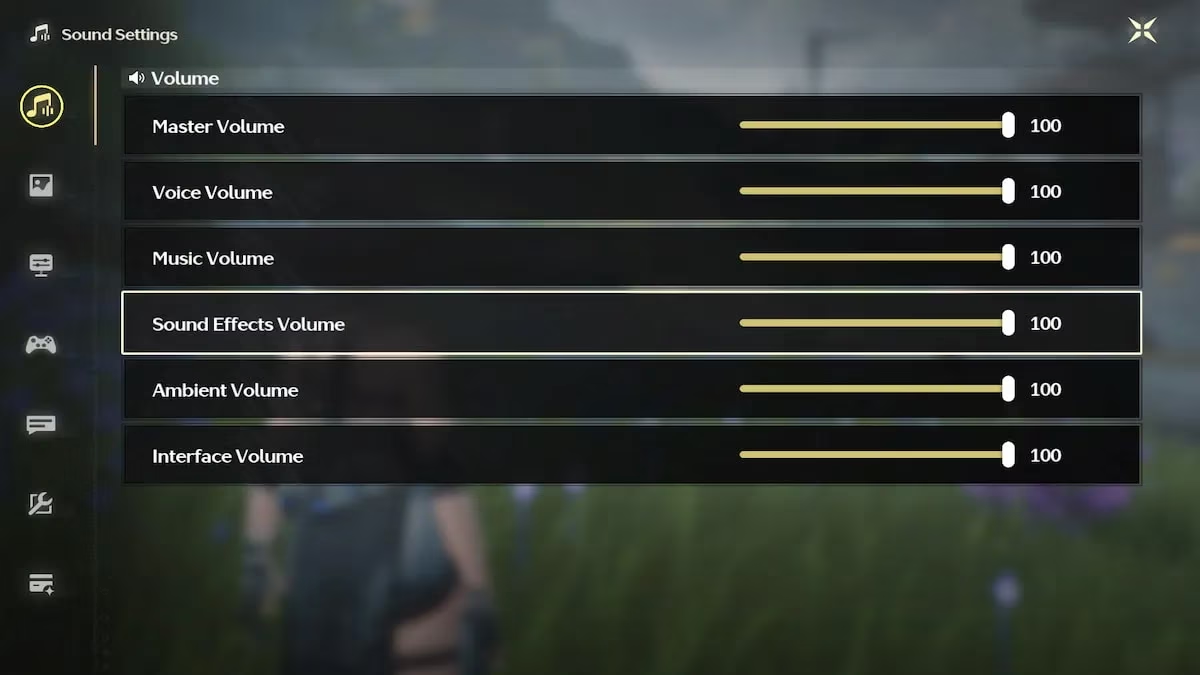
Here you’ll see sliders for master volume, music, dialogue, sound effects, and even voice‑over language. In my case, the “Music” slider had somehow nosedived to zero – maybe a mischievous pixel gremlin did it while I was away? I slid it back to 100%, and the orchestra burst forth like a long‑lost friend. Also, check the voice volume. Sometimes dialogue is the only thing missing, making cutscenes feel like a bad miming contest.
If all the in‑game volumes look fine but you still hear nothing, the problem isn’t inside the game’s brain – it’s your device playing deaf.
The outside world – your device’s sound output
Right‑click the little speaker icon on your taskbar (or dig into your phone’s sound settings) and verify where your audio is headed. More than once, I’ve plugged in headphones for a late‑night session and forgotten to switch the output back to my speakers in the morning. Wuthering Waves will obediently pipe its audio to a device that isn’t even connected, leaving your room in a void. Also, make sure Windows or your mobile OS hasn’t quietly muted the game in its volume mixer. And if you’re on PC, double‑check that your audio drivers haven’t decided to take a vacation – a quick driver update can work true miracles.
When all else fails – wait, or call for backup
If you’ve danced through all these steps and the game is still performing a silent movie tribute, then the bug probably isn’t yours. Even in 2026, after two years of polishing, Wuthering Waves still occasionally throws a random audio fit – usually right after a major update. The devs are usually quick to drop a hotfix, so keep an eye on the launcher or the official Discord. You can also file a ticket with the support team; they’ve actually become quite responsive over the years and might toss you a few Astrite for the trouble.
Spicing up the silence – my personal playlist saga
Here’s the thing: even when the audio works perfectly, Wuthering Waves isn’t exactly a concert hall. You’ll hear music on menus and during summons, and there’s some delicate ambient sound while exploring, but the world doesn’t constantly blare a soundtrack. Some players love that minimalism; I find it leaves a little too much room for my own anxious thoughts. So, I became my own DJ.
Back in the day, the community on Reddit shared killer playlists from other games and anime, and those recommendations are still gold in 2026. I’ve added a few recent gems, too. Fire up your Spotify, YouTube, or whatever your streaming drug of choice is, and try these out:
🎮 For battling – get your adrenaline on
| Game / Anime | Track | Why it fits |
|---|---|---|
| Genshin Impact | Polumnia Omnia | Makes every dodge feel like a final boss duel |
| Genshin Impact | God‑Devouring Mania | Chaotic, fast, perfect for mobs |
| Kono Subarashii Sekai ni Shukufuku wo! | Greatest Battle Music of All Time | Cheesy but gets the blood pumping |
| Genshin Impact | Arlecchino Boss Theme Phase 2 | That drop at 1:24 should be illegal |
| Honkai: Star Rail (new for 2025!) | "The Return of the King" | Orchestral madness for echo farming |
🌄 For adventuring – chill vibes for wandering
| Game | Track / Compilation | Vibe |
|---|---|---|
| Genshin Impact | City of Winds and Idylls | Breezy, like Mondstadt had a baby with Jinzhou |
| Genshin Impact | Fontaine | Elegant water‑themed calm |
| Zelda: Tears of the Kingdom | Relaxing Compilation | Piano and wind, perfect for climbing |
| Wuthering Waves (new OST!) | "Lament of the Departed" | The 2025 expansion music finally nailed open‑world serenity |
🏙️ For city exploration – wandering the markets
| Game | Track |
|---|---|
| Genshin Impact | Jade Moon Upon a Sea of Clouds |
| Genshin Impact | Peripatetic Peregrination |
| Genshin Impact | Yilong Wharf |
| Octopath Traveler II | "The Harborlands" |
Feel free to mix and match or build your own playlist. The goal is to make your time in Solaris feel either more epic or more meditative – whichever your mood demands. I’ve found that a custom soundtrack turns a silent bug into an opportunity to fall in love with the game all over again.
So next time Wuthering Waves decides to take a vow of silence, don’t rage‑quit. Try the fixes, then if the sounds still won’t play, crank up some Genshin boss themes and pretend you’re in an AMV. You might just have an even better time.